
Skip to content
Globe with "Digital Nomad and a Dog" written across it. There's a small paw print at the bottom.
  • About MeExpand
    • Contact
  • Digital Nomad Life
  • DestinationsExpand
    • All Destinations
    • MexicoExpand
      • Cozumel
      • Cancun
  • Travel With a Dog
  • ResourcesExpand
    • Digital Nomad Packing List
    • Quiz: Are You a Travel Genius?
Globe with "Digital Nomad and a Dog" written across it. There's a small paw print at the bottom.

Digital Nomad and a Dog contains affiliate links and is a member of the Amazon Services LLC Affiliate Program. If you make a purchase using one of these Amazon (or other) links, I may receive compensation at no cost to you. Read my disclosure policy for more information.

10 Best Laptops for Zoom Meetings

BySherry Arkfeld August 20, 2025January 23, 2026 UpdatedJanuary 23, 2026
  • Quick Picks: Best of the Best
  • 10 Best Laptops for Zoom Meetings
    • 1. Apple MacBook Pro 14 (M4)
    • 2. Apple MacBook Air M4 (13 or 15 inch)
    • 3. Microsoft Surface Laptop 7 (Copilot+ PC)
    • 4. HP Spectre x360 14
    • 5. Lenovo Yoga 9i 14
    • 6. Asus Zenbook S 16
    • 7. Dell XPS 13
    • 8. Acer Swift Go 14 AI
    • 9. Acer Swift 14 AI
    • 10. Lenovo Chromebook Plus 14
  • Must-Have Accessories
  • Wrap-Up: Best Laptops for Zoom Meetings

If you spend a lot of time in Zoom meetings like I do, you know your laptop can make or break the experience.

A grainy camera, muffled mic, or battery that dies mid-call isn’t just frustrating. It looks unprofessional.

I’ve pulled together the 10 best laptops for Zoom meetings in 2025, based on hands-on reviews and my own experience as someone who lives on video calls for work.

These laptops stand out for their webcam quality, audio, performance, and battery life, everything you actually need for long days of meetings.

Quick Picks: Best of the Best

  • Best Overall: Apple MacBook Pro 14 (M4) – The best webcam and audio setup on the market with all-day battery life.
  • Lightest Weight: Apple MacBook Air M4 (13 inch) – Slim, portable, and powerful, with the same great webcam as the Pro in a much lighter package.
  • Best Budget: Acer Swift Go 14 AI – Affordable, with a sharper 1440p webcam than many premium laptops and enough battery to last a full day of calls.

10 Best Laptops for Zoom Meetings

1. Apple MacBook Pro 14 (M4)

Why it’s great: The Apple MacBook Pro 14 is one of the most powerful laptops available and comes with a 12MP Center Stage webcam, incredible speakers, and studio-quality mics. You’ll never lag while screen sharing or multitasking.

Apple 2024 MacBook Pro Laptop with M4 Pro, 14‑core CPU, 20‑core GPU: Built for Apple Intelligence, 16.2-inch Liquid Retina XDR Display, 24GB Unified Memory, 512GB SSD Storage; Space Black

Pros

  • Best-in-class webcam and audio setup
  • Long battery life (up to 18 hours)
  • Gorgeous Liquid Retina XDR display
  • Plenty of ports including HDMI and SD card slot

Cons

  • Expensive
  • Heavier than the MacBook Air
  • Locked into the Apple ecosystem
Check MacBook Pro 14 Price

2. Apple MacBook Air M4 (13 or 15 inch)

Why it’s great: The Apple MacBook Air M4 is light, powerful, and has the same 12MP Center Stage camera as the Pro. It’s portable, lasts all day, and costs less than the Pro.

Apple 2025 MacBook Air 15-inch Laptop with M4 chip: Built for Apple Intelligence, 15.3-inch Liquid Retina Display, 16GB Unified Memory, 256GB SSD Storage, 12MP Center Stage Camera, Touch ID; Midnight

Pros

  • Excellent webcam for video calls
  • Super portable design
  • Long battery life
  • Cheaper than the MacBook Pro

Cons

  • Limited ports (adapters may be needed)
  • Not ideal for heavy creative work
Check Apple MacBook Air M4 Price

3. Microsoft Surface Laptop 7 (Copilot+ PC)

Why it’s great: The Microsoft Surface Laptop 7 is sleek, powerful, and designed with video calls in mind. It includes a 1080p Studio Camera, built-in AI background effects, and Wi-Fi 7 for stable meetings.

Microsoft Surface Laptop (2024), Windows 11 Copilot+ PC, 13.8" Touchscreen Display, Snapdragon X Plus (10 core), 16GB RAM, 512GB SSD Storage, Black
Microsoft Surface Laptop (2024), Windows 11 Copilot+ PC, 13.8″ Touchscreen Display, Snapdragon X Plus (10 core), 16GB RAM, 512GB SSD Storage, Black

Pros

  • Sharp 1080p webcam
  • Slim, stylish design
  • Wi-Fi 7 for reliable calls
  • Excellent battery life

Cons

  • Fewer ports than some competitors
  • Accessories can get expensive
Check Microsoft Surface Price

4. HP Spectre x360 14

Why it’s great: The HP Spectre x360 14 is a convertible 2-in-1 with one of the only 4K webcams on the market. It also has a stunning OLED display, making you look sharp on video calls.

HP Spectre X360 14 2-in-1 Laptop | 13.5" WUXGA+ Touch 400 nits 100% sRGB | Intel 10-Core i7-1355U | 16GB DDR4 512GB SSD | Backlit Fingerprint Thunderbolt Sleeve Win11Pro Black + 32GB MicroSD Card
HP Spectre X360 14 2-in-1 Laptop | 13.5″ WUXGA+ Touch 400 nits 100% sRGB | Intel 10-Core i7-1355U | 16GB DDR4 512GB SSD | Backlit Fingerprint Thunderbolt Sleeve Win11Pro Black + 32GB MicroSD Card

Pros

  • Exceptional 4K webcam
  • Vibrant OLED display
  • Flexible 2-in-1 design
  • Solid battery life

Cons

  • More expensive than midrange laptops
  • Can run warm under heavy load
Check HP Spectre x360 Price

5. Lenovo Yoga 9i 14

Why it’s great: The Lenovo Yoga 9i is a premium 2-in-1 laptop with a 5MP or 1440p webcam and powerful Bowers & Wilkins speakers. It’s ideal for both looking and sounding professional on Zoom.

2025 Lenovo Yoga 9i 2-in-1 Business AI PC Laptop (14" 2.8K 120Hz Touchscreen, Intel 16-core Ultra 7 155H, 16GB RAM, 1TB SSD, Arc Graphics, Stylus) Backlit, FP Reader, IR Webcam, B&W Audio, Win 11 Home
2025 Lenovo Yoga 9i 2-in-1 Business AI PC Laptop (14″ 2.8K 120Hz Touchscreen, Intel 16-core Ultra 7 155H, 16GB RAM, 1TB SSD, Arc Graphics, Stylus) Backlit, FP Reader, IR Webcam, B&W Audio, Win 11 Home

Pros

  • High-quality webcam
  • Superior built-in soundbar
  • Beautiful OLED display
  • Convertible design

Cons

  • Battery life is shorter than MacBooks
  • Higher price point
Check Lenovo Yoga 9i Price

6. Asus Zenbook S 16

Why it’s great: The Asus Zenbook S 16 is a slim 16-inch laptop with an OLED display, Wi-Fi 7, and solid battery life. Despite the larger screen, it’s surprisingly light.
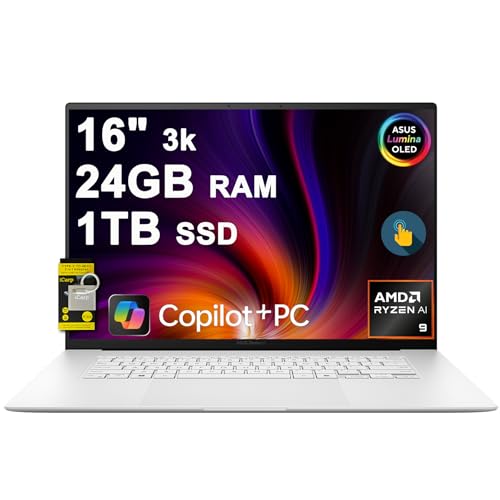
ASUS Zenbook S 16 Laptop 16" 3k OLED 120Hz Touch (100% DCI-P3, 500nits HDR) AMD 10-core Ryzen AI 9 365 (Up to 50 Tops) 24GB RAM 1TB SSD for Creator Business Professional Win11 ICP Hub w/Copilot+ AI
ASUS Zenbook S 16 Laptop 16″ 3k OLED 120Hz Touch (100% DCI-P3, 500nits HDR) AMD 10-core Ryzen AI 9 365 (Up to 50 Tops) 24GB RAM 1TB SSD for Creator Business Professional Win11 ICP Hub w/Copilot+ AI

Pros

  • Large OLED display
  • Wi-Fi 7 support
  • Lightweight for its size
  • Good battery life

Cons

  • Larger footprint than 13–14 inch laptops
  • Webcam is good but not standout
Check Asus Zenbook S Price

7. Dell XPS 13

Why it’s great: The Dell XPS 13 is a sleek premium Windows laptop with a sharp design, quad speakers, and a solid webcam. It’s smaller and lighter than the XPS 15 but still powerful.

2025 Dell XPS 13 9345 Laptop, Copilot+ AI PC (13.4" FHD+ 120Hz, Snapdragon X Plus (> Intel i7-1355U), 16GB 8448MT/s RAM, 512GB SSD), Thin & Light, 27 Hours Battery Life, IR Webcam, Wi-Fi 7, Win 11 Pro
2025 Dell XPS 13 9345 Laptop, Copilot+ AI PC (13.4″ FHD+ 120Hz, Snapdragon X Plus (> Intel i7-1355U), 16GB 8448MT/s RAM, 512GB SSD), Thin & Light, 27 Hours Battery Life, IR Webcam, Wi-Fi 7, Win 11 Pro

Pros

  • Beautiful design
  • Great speakers for calls
  • Compact and portable
  • Balanced performance and battery

Cons

  • Pricier than Dell’s Inspiron line
  • Webcam is average compared to newer 1440p options
Check Dell XPS 14 Price

8. Acer Swift Go 14 AI

Why it’s great: The Acer Swift Go 14 AI is an affordable laptop with a 1440p webcam that outperforms many premium models. It’s light, slim, and lasts through a full day of calls.

Acer Swift Go 14 AI Copilot+ PC | 14.5" 2.5K 120Hz Display | Unlock AI Experiences | Snapdragon X Plus 8-Core Processor | 16GB RAM | 1TB Gen 4 SSD | Wi-Fi 7 | Windows 11 Home | SFG14-01-X006
Acer Swift Go 14 AI Copilot+ PC | 14.5″ 2.5K 120Hz Display | Unlock AI Experiences | Snapdragon X Plus 8-Core Processor | 16GB RAM | 1TB Gen 4 SSD | Wi-Fi 7 | Windows 11 Home | SFG14-01-X006

Pros

  • Budget-friendly
  • Sharp 1440p webcam
  • Lightweight and slim
  • Long battery life

Cons

  • Build quality is less premium
  • Speakers are average
Check Acer Swift Go 14 AI Price

9. Acer Swift 14 AI

Why it’s great: The Acer Swift 14 AI is a dependable budget laptop with strong everyday performance and smooth visuals. It offers excellent value for the price.

Acer Swift 14 AI Copilot+ PC | 14" WUXGA 16:10 Touch Display | Intel Core Ultra 7 Processor 258V | Evo Edition | Intel ARC 140V | 32GB LPDDR5X | 1TB Gen 4 SSD | Killer Wi-Fi 7 | SF14-51T-75AF
Acer Swift 14 AI Copilot+ PC | 14″ WUXGA 16:10 Touch Display | Intel Core Ultra 7 Processor 258V | Evo Edition | Intel ARC 140V | 32GB LPDDR5X | 1TB Gen 4 SSD | Killer Wi-Fi 7 | SF14-51T-75AF

Pros

  • Long battery life
  • Strong performance
  • Sleek design
  • Affordable

Cons

  • Webcam is only 1080p
  • Build not as durable as high-end models
Check Acer Swift 14 AI Price

10. Lenovo Chromebook Plus 14

Why it’s great: The Lenovo IdeaPad Chromebook Plus 14 is simple, lightweight, and affordable. It has long battery life and surprisingly good speakers, making it perfect for students or casual users.

Lenovo IdeaPad Flex 5i Chromebook Plus 14" FHD+ 2-in-1 Touchscreen Laptop (Intel Core i3-1315U, 8GB RAM, 256GB Storage), Backlit, FHD Webcam, Chrome OS, w/Google AI, 2TB of Cloud Storage, Grey
Lenovo IdeaPad Flex 5i Chromebook Plus 14″ FHD+ 2-in-1 Touchscreen Laptop (Intel Core i3-1315U, 8GB RAM, 256GB Storage), Backlit, FHD Webcam, Chrome OS, w/Google AI, 2TB of Cloud Storage, Grey

Pros

  • Low cost
  • Easy to use
  • Long battery life
  • Better-than-expected audio

Cons

  • Limited for professional desktop apps
  • Slower with heavy multitasking
Check Lenovo Chromebook Plus Price

Must-Have Accessories

You need a lot of specific equipment to work remotely. Having the right accessories can make a significant difference.

Here are some essential items that can enhance your video conferencing experience, especially for digital nomads:

Noise-Canceling Headphones

Good audio is just as important as clear video. Noise-canceling headphones can help block out background noise, making it easier for you to hear and be heard.

Many models come with built-in microphones that offer superior sound quality compared to standard laptop microphones.

Portable External Microphone

For even better audio quality, consider a portable external microphone. These microphones can provide crisp, clear audio and are especially useful if your work involves a lot of speaking or if you’re in a noisy environment.

Laptop Stand

A portable laptop stand can help raise your laptop to eye level, which is better for your posture and positions the camera at a more flattering angle.

Look for a lightweight, portable stand, especially if you tend to work from different locations.

Portable Lighting

Good lighting is crucial for professional-looking video calls. A portable LED light that clips onto your laptop or stands on your desk can help illuminate your face evenly, making you look better on camera.

External Keyboard and Mouse

If you spend long hours on your laptop, an external keyboard and mouse can offer greater comfort and efficiency.

Be sure to choose a rechargeable mouse to avoid needing batteries.

USB Hub or Docking Station

Since many ultraportable laptops come with a limited number of ports, a USB hub or docking station can expand your connectivity options.

This is particularly useful if you’re using multiple accessories, such as an external webcam, microphone, and hard drive.

Portable Charger

For digital nomads, a portable charger or power bank that supports your laptop can be a lifesaver, especially when working from locations where power outlets may not be readily available.

A laptop screen displaying a virtual meeting with multiple participants in a grid layout. In the foreground, a person is holding a document with charts, suggesting they are attending or presenting in the online meeting. The background features a blurred cityscape visible through a window.

Wrap-Up: Best Laptops for Zoom Meetings

The Apple MacBook Pro 14 (M4) is the best overall laptop for Zoom meetings. The Apple MacBook Air M4 is a great lightweight alternative.

If you’re on a budget, the Acer Swift Go 14 AI gives you the best webcam for the price.

No matter which one you choose, these laptops will help you look sharp, sound clear, and get through your meetings without stress.

Ladies, join my free, private Facebook group, Women Over 50 Digital Nomads. It’s a safe place to connect, learn, and thrive as a digital nomad. You don’t need to be over 50 but you do need to be a woman.

Related Posts

  • Digital Nomad Equipment & Gear
  • Navigating the World of Digital Nomad Housing
  • Working for a US Company While Living Abroad
  • Best Freelance Jobs for Beginners
  • Digital Nomad Travel Insurance Plans
  • Best Spaces for Coliving in Mexico
  • Best Laptops for Digital Nomads and Remote Workers
  • How to Find Affordable Digital Nomad Health Insurance
  • Pros and Cons of Being a Digital Nomad
  • Countries With Good and Affordable Healthcare
  • How to Successfully Transition Into Copywriting
Sherry Arkfeld

Sherry Arkfeld is a digital nomad, travel blogger, and copywriter living her dream of being able to work from anywhere in the world while exploring new places with her little dog, Shelby. Sherry is passionate about sharing her experiences to help other travelers and digital nomads. Sherry and Shelby are currently traveling slowly around Mexico with plans to eventually go (almost) everywhere.

Facebook Instagram

Post navigation

Previous Previous
15 Best Laptops for Digital Nomads and Remote Workers
NextContinue
Cozumel Weather in December: What to Expect and Travel Tips

Who am I?

My dog, Shelby with a sandy nose. She's a black Yorkie-poo and very furry. She looks like she's smiling.

I'm Sherry and this is Shelby, my beach-loving pup. I'm a digital nomad living the life I've been dreaming about for many years. My happy place is a Caribbean beach with warm, turquoise water.

I'm here to help others to be successful digital nomads. I tell you about jobs you can do remotely, where to live, and what to do when you get there.

I'm also here with the scoop on traveling with your dog. It gets tricky but I can help.

Since I've been living in Mexico for over two years, I've got a TON of info on where to go and what to do in this amazing country.

Learn more about me (and Shelby)
  • Facebook
  • Instagram

The Digital Nomad Planning Bundle is your roadmap to location freedom. It includes a workbook to plan your transition, a checklist to stay on track, and an ebook on making money as a freelancer.

Click here to learn more.


My book is available on Amazon! Here's your blueprint to build your perfect life. Includes downloadable checklists and other resources.

Book cover with "You'll be Murdered by a Drug Cartel" written in grey, black, and red.

Click here to get your free 47-page ebook.

Facebook Instagram

© 2026 Digital Nomad and a Dog | Privacy Policy | Terms & Conditions | Disclaimer

Contact

Scroll to top
  • About Me
    • Contact
  • Digital Nomad Life
  • Destinations
    • All Destinations
    • Mexico
      • Cozumel
      • Cancun
  • Travel With a Dog
  • Resources
    • Digital Nomad Packing List
    • Quiz: Are You a Travel Genius?